
- NURSE CALL SOLUTIONSBasic Wireless nurse call systemBasic Wirless Nurse Call SystemMeeyi Basic Wireless nurse call system offer instant, reliable communication. A wireless call system can be used for patients to contact nurses or doctors regarding emergency issues or for patients to alert nurses and doctors.
 Smart wireless nurse call systemSmart wireless nurse call system
MEEYI Smart wireless call system is with a smart wireless calling receiver to collect the patients’ calling infomation, help hospital get more call data statistics.
 Wireless nurse call system with PC softwareWireless nurse call system with PC softwareBy adding a PC software management to manage mulitple hospital pager systems in the nurse stations.
 Wired two-way communication nurse call systemsWired two-way communication nurse call systems
MEEYI Wired nurse call system supports patients, nurse, doctors two-way voice communication.

- NURSING HOME SOLUTIONSSmall Nursing Home
(less 20 beds)Small Nursing HomeMEEYI pure wireless receiver in elderly care home’s reception can help caregivers fast respond the seniors’ request. MEEYI also provides wireless call lanyards to seniors. When they encounter any security situation, they can get the attention of the caregiver by pressing the call button.
Mledium Nursing Home
(more than 20 beds but less than 100 beds)Medium Nursing HomeMEEYI Smart Elderly nursing call system not only provide the convenience for the elderly to call and the nursing staff to respond to the call information at the first time, but also provide functions such as data collection and analysis, so that the nursing staff can analyze the situation of the elderly.
Big Nursing Home
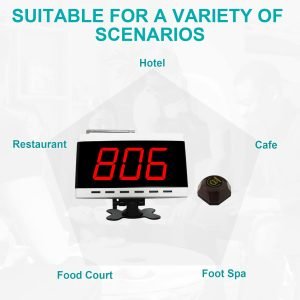
(more than 100 beds)Big Nursing HomeThe best call wireless system with PC software management can help the elderly care home realize the unified hierarchical management function of different floors, which is more convenient for the elderly care home management and data analysis. Especially for large nursing homes, it can greatly improve work efficiency and save labor costs. - OTHER CALL SOLUTIONSRestaurants SolutionsRestaurants SolutionsMEEYI wireless paging systems are ideal for cafes, restaurants, hawkers, and other F&B establishments. Standalone and hardware-based, it’s a simple and effective solution to better optimize your operational flow. Better manage your labor by using MEEYI paging system to automate processes with effective communication through our solutions. In addition to providing product solutions, MEEYI also provides software docking solutions.Hotels Call SolutionsHotels Call SolutionsThe hotel wireless emergency SOS buttons provide more security for customers and employees. Compared with the traditional emergency buttosn, the wireless SOS button is more convenient and smarter.Blue code Emergency call systemBlue Code Emergency Call System
MEEYI Code Blue Wireless panic alarm systems provide a quick way to alert Hospitals’ rapid response teams ready to go when they get notified about a code blue. It is water and impact resistant and is a wireless hassle-free system with ODM & OEM support. The main receiver is for the Nurse Station, the Code Blue Lamp is for the corridor, and the Code blue buttons are for the bedside. Repeaters are optional.
Disable emergency Call systemDisable Toilet Emergency CallWireless Disable Toilet Emergency Call that is designed for people with disabilities provide a fast and easy way to call for help in an emergency situation. A radio-based disabled refuge system has several benefits, including a faster installation process, minimal disruption, no need for expensive cabling, and is perfect for retrofitting.Bank Intercom & Queue SolutionsBank Intercom & Queue SolutionsThere are different solutions from MEEYI for banks, including wireless queue systems, bank counter window intercom systems, bank emergency call systems, bank VOIP intercom systems and so on.School Emergency Call SolutionsSchool Emergency Call SolutionsIncreasingly, school districts are turning to new emergency response solutions to protect their students and staff. MEEYI emergency call system solutions do the options schools to best protect students and staff.Factory Call & Intercom SolutionsFactory Call & Intercom SolutionsA safe and efficient production line or factory management requires a timely response to failures in the production process. MEEYI factory emergency call solution greatly improves the production efficiency of the factory.Parking Lots SolutionsParking lots solutionsA parking facility may have multiple floors and a complex layout. When an emergency event occurs, MEEYI parking lot emergency alert solutions will alert the dangers and be an obstacle for the manager to figure out the location in time. Installing a Parking emergency system has removed most of the stress from customers.Fitting Room | SPAs and Others SolutionsFitting Room,SPA & othersMEEYI wireless call button can be placed in each fitting room, Shisha Lounge, Cinimas, Stores to facilitate employees to provide services to customers in a timely manner. Improve customers shopping experience. - All MEEYI PRODUCTS
- ABOUT MEEYI
- User Videos
- DOWNLOAD
- FAQ
 MEEYI
MEEYI