
You may also like


Page 3 of 3

MEEYI Smart wireless call system is with a smart wireless calling receiver to collect the patients’ calling infomation, help hospital get more call data statistics.


MEEYI Wired nurse call system supports patients, nurse, doctors two-way voice communication.

MEEYI pure wireless receiver in elderly care home’s reception can help caregivers fast respond the seniors’ request. MEEYI also provides wireless call lanyards to seniors. When they encounter any security situation, they can get the attention of the caregiver by pressing the call button.
MEEYI Smart Elderly nursing call system not only provide the convenience for the elderly to call and the nursing staff to respond to the call information at the first time, but also provide functions such as data collection and analysis, so that the nursing staff can analyze the situation of the elderly.
MEEYI Code Blue Wireless panic alarm systems provide a quick way to alert Hospitals’ rapid response teams ready to go when they get notified about a code blue. It is water and impact resistant and is a wireless hassle-free system with ODM & OEM support. The main receiver is for the Nurse Station, the Code Blue Lamp is for the corridor, and the Code blue buttons are for the bedside. Repeaters are optional.
The MEEYI Wireless Call System Receiver W611-48X is a robust, user-friendly device designed to handle calls in hospitals, clinics, restaurants, hotels, and elder care facilities. It pairs seamlessly with multiple wireless call buttons, displaying clear call numbers and sounding alerts to ensure staff respond quickly.
Moreover, the W611-48X offers a simple method to delete or unbind call buttons. This makes it easy to update your system when buttons are replaced or locations change. With stable RF communication and an energy-efficient build, this receiver delivers reliable, interference-free performance in busy environments. Its compact design fits neatly on a desk or mounts on a wall.
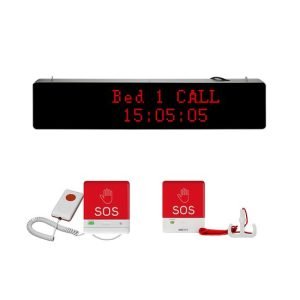
Delete Buttons Easily: Quickly remove old or relocated call buttons.
Multi-Button Support: Manage numerous paired call buttons.
Clear Alerts: LED numbers plus sound keep staff instantly informed.
Stable RF Signal: Reliable performance without interference.
Flexible Placement: Use on desks or mount on walls.
Energy Efficient: Designed for long life with minimal maintenance.
Connect power or insert batteries as specified in the manual.
Pair new buttons by pressing the pairing button on the Receiver W611-48X and then activating the call button.
Repeat to bind multiple buttons.
Press and hold the delete (or unbind) button on the receiver until the indicator flashes.
Press the call button you wish to remove.
The display confirms deletion, unbinding that button from the system.
When a paired button is pressed, the Receiver W611-48X displays the call number and sounds an alert.
Staff check the screen and respond immediately.
The display resets automatically after acknowledgment.
Test call buttons weekly to verify all bindings are current.
Delete and re-pair buttons if you move or replace them.
Wipe the receiver with a soft cloth to keep it clean.
✅ Note:
Always position the W611-48X where staff can easily see and hear alerts. This ensures every call receives a fast, professional response.
 MEEYI
MEEYI